

Get to know Surface Laptop 2
To help you get around, here are some diagrams for Surface Laptop 2.
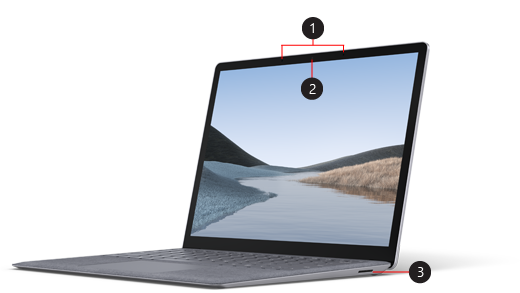
- Studio Mics
- Windows Hello facial-recognition camera
- Surface Connect port
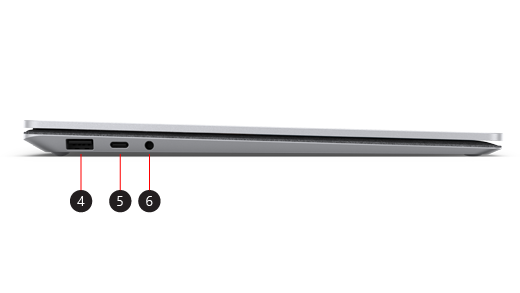
4. USB port
5. USB-C port
6. Headphones jack
Surface Laptop 2 and Windows 11
Surface Laptop 2 comes with:
- Windows 11 Home edition (for consumer customers)
- Windows 11 Pro edition (for business customers)
If you have Windows 11 Home on your device, you can upgrade to Windows 11 Pro for an additional cost. For more info, see Upgrade Windows 11 Home to Windows 11 Pro.
To find out which version of Windows you have, see Which Windows operating system am I running?
Surface Laptop 1 features
Thin and light design
Surface Laptop 3 is thin and light and starts at just 2.76 pounds, so you can take it with you throughout your day. Choose between a 13.5” and 15” screen—depending on what works best for the work you do. Each one is a PixelSense™ Display with touchscreen to give you razor-sharp resolution.
Get the performance you need
For personal use, choose between a 8th Gen Intel® Core™ Microsoft Surface Edition processor to get the power and performance you want so you can do your best work. For business customers, the latest 10th Gen Intel® Core™ processor gives you the power you need to get the job done.
Choose the finish and color for you
Choose between the new metal palm rest or familiar Alcantara® material—you can get the look and feel that suits you. No matter which one you choose, you’ll get the comfort you want when typing and using your Surface Laptop 3. It’s available in different colors too, so you can choose the color that looks great to you.
Work the way you want with USB-C
Connect to an external display, docking station, newer USB devices and more using USB-C. For those times when you leave your charger at home, just grab a USB-C cable and charge your Surface Laptop 3 that way for a little extra battery when you need it. Surface Laptop 3 has a USB-A port too, so you can connect your other USB devices at the same time. For more info about charging using USB-C, see How to charge Surface.
Do more with Windows and Microsoft 365
Enjoy familiar features like Windows Hello to quickly sign in and Microsoft Edge for fast browsing. Get Microsoft 365 to create your best work and store it safely in Microsoft OneDrive. When you store your documents on OneDrive, you can get to them from your PC or phone, so they’re always in reach.